


A website can publish useful pages and still make the right information hard to find. When important pages feel disconnected or several pages compete for the same search, adding more content can make the problem worse. Creating SEO-friendly content architecture starts with a better question: what does each visitor need to find, and where should that journey lead?
If your team has struggled to decide which pages to create, combine, or prioritize, you’re not alone. A clear structure helps people move naturally through your site and gives search engines useful context about how pages relate. It also gives your team a shared plan for building content around audience needs and business priorities.
This guide explains how to map search intent to useful pages, organize topics into a logical hierarchy, and connect those pages through navigation and internal links. You’ll also learn how to spot overlapping content and build a site plan that can grow with your business. The goal is a website where every page has a purpose and supports a clear path from discovery to action.
Key Takeaways
- Build your site structure around audience questions, business goals, and the intent behind relevant searches.
- Choose a hierarchy, topic-cluster, or hub-and-spoke model based on how your content and business are likely to grow.
- Audit existing pages and URLs, then map each page’s purpose, audience, and place in a visual sitemap.
- Creating SEO-friendly content architecture means connecting useful pages through clear navigation and intentional internal links.
- Coordinate SEO research and website design so your site plan supports discoverability and a smooth visitor journey.
What Is SEO-Friendly Content Architecture, and Why Does It Matter?
SEO-friendly content architecture is the planned organization of a website’s pages and the links between them, so people and search engines can understand what each page covers and how the pages relate.
Think of it as the map behind your website. A clear hierarchy groups related pages, navigation helps visitors move between them, and internal links connect useful information. Creating SEO-friendly content architecture gives every page a defined role and place, rather than leaving important content isolated or competing for attention.
For a quick look at creating search-focused content, watch this lesson from Semrush:
How does content architecture differ from content strategy?
Content strategy sets the direction: who you want to reach, what you want to achieve, which topics matter, and what formats will serve your audience. Architecture organizes the pages that support that direction. Strategy might identify a need to explain a service and answer common customer questions. Architecture determines whether those answers belong on one page, in a related group, or under a broader service section.
Architecture also differs from keyword research and individual-page optimization. Keyword research helps reveal the language and intent behind searches. Page optimization improves a specific page’s relevance and clarity. Architecture connects the broader set of pages, helping prevent overlap and giving each topic an appropriate home.
How does site structure help visitors and search engines?
Imagine a home-services company with a main “Services” page. That parent page could lead to category pages for plumbing and electrical work, which then link to detailed pages for specific services. Visitors can follow a familiar path from a broad need to a relevant service. Search engine crawlers can also discover pages through links and use their context to understand how those pages relate.
Useful links do more than move people around. A link from a category page to a specific service page helps clarify the relationship between them, while clear navigation makes important information easier to locate. These choices support discoverability and usability, but they don’t guarantee rankings. They create a sound foundation alongside relevant content and other SEO work.
This approach shares ground with information architecture, the practice of organizing and labeling information so people can find and understand it. Information Architecture on Wikipedia provides a broader introduction to the concept. Applied to a website, the principle is practical: make the path between a visitor’s question and the page that answers it clear.
How to Map Topics, Search Intent, and Pages Before Building Your Structure
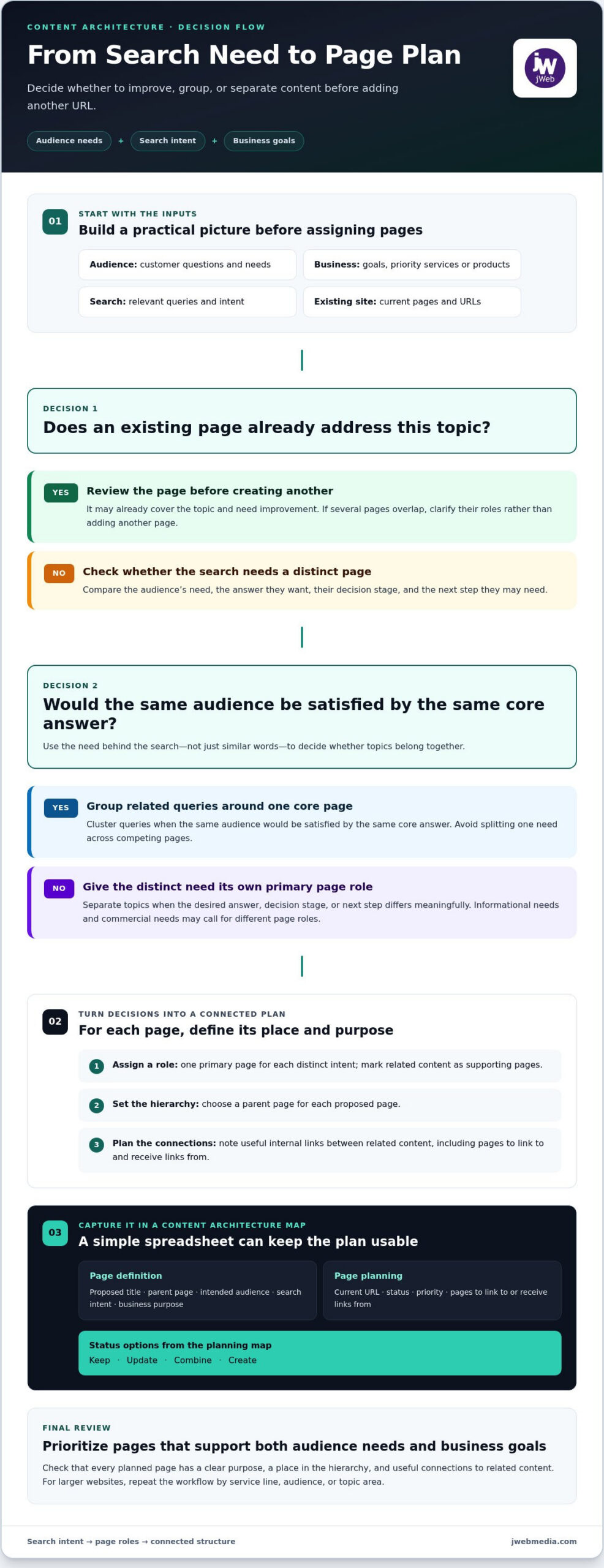
Before assigning pages to a hierarchy, build a practical picture of what your audience needs and what your business needs the site to achieve. Start with customer questions, priority services or products, existing pages, and relevant search queries. Search terms reveal what people may be looking for, while audience needs and business goals help you decide which opportunities deserve a page.
Group topics by the need behind the search. Informational intent usually means someone wants to understand a subject or solve a problem. Commercial intent suggests they’re comparing options or looking for a service. Give each distinct intent a clear primary page role. For example, a guide explaining how a service works and a page describing that service may cover related terms, but they answer different needs and should have distinct purposes.
How do you group topics without creating competing pages?
Cluster queries when the same audience would be satisfied by the same core answer. Separate them when the desired answer, decision stage, or next step differs meaningfully. Before proposing a new URL, review existing pages. One may already address the topic and need improvement, or several pages may need clearer roles instead of another addition.
Use this workflow for a small site or a large one. Larger websites may need to repeat it by service line, audience, or topic area.
- Set the direction. Note the audience, business goals, and key actions the website should support.
- Gather inputs. List customer questions, relevant search queries, and current pages with their URLs.
- Group by need and intent. Sort related questions into topic groups, then distinguish informational needs from commercial ones.
- Assign page roles. Choose one primary page for each distinct intent. Mark related content as supporting pages and identify overlaps to review.
- Connect the structure. Set a parent page for each proposed page and note useful internal links between related content.
- Prioritize and review. Record each page’s status and priority, then check that the planned pages support audience needs and business goals.
What belongs in a content architecture map?
Make the map useful to the people who will plan, write, and maintain the site. For each page, record its proposed title, parent page, intended audience, search intent, and business purpose. Add its current URL and status, such as keep, update, combine, or create. Include its priority and the pages it should link to or receive links from.
A simple spreadsheet can work: each row represents a page, and each column captures one planning decision. For broader planning context, see an SEO content strategy guide. With the map in place, your team can discuss page roles and gaps before writing new content, reducing avoidable duplication and making structural decisions clearer.
Which Content Architecture Model Fits Your Website and Growth Plans?
Choose a structure based on how visitors look for information and how your content is related, not on which model sounds most advanced. A hierarchical structure organizes pages by parent and child relationships. Topic clusters group related pages around a central subject. A hub-and-spoke model uses a central page to direct visitors to focused supporting pages. These patterns can overlap, and most business websites combine them.
Use this comparison as a starting point, not a set of rules:
| Model | Best fit | Strengths | Potential limitations |
|---|---|---|---|
| Hierarchical | Sites with clear service, product, or resource categories | Makes parent-child relationships and navigation easy to follow | Excessive nesting can put useful pages too far from key sections |
| Topic cluster | Sites covering a subject through several related questions | Connects a broad topic page with focused supporting content | Can lead to repetitive or thin pages if every query gets its own URL |
| Hub-and-spoke | Sites that need a central overview to guide visitors to specific resources | Creates a clear starting point and routes visitors to deeper information | A hub can become crowded or vague if its purpose and links aren’t curated |
When does a hierarchical structure work best?
Hierarchy works well when your offerings or resources fall into clear categories. A service business might organize pages under “Services,” then group detail pages under categories such as “Website Design” or “SEO.” Visitors can move from a broad overview to a focused answer without having to understand the company’s internal terminology. Keep the path sensible: too many nested levels can make important pages harder to reach.
When should you use topic clusters or hub pages?
Use a cluster when related audience questions deserve separate, substantial answers. A central page can introduce the subject and link to supporting pages that explore distinct subtopics. A hub-and-spoke arrangement is similar, but emphasizes the hub as a useful starting point for navigating focused resources. In either model, publish a supporting page only when it adds real value. Thin pages created just to fill out a cluster can clutter the site instead of helping visitors.
There’s no SEO advantage in making a structure more complex than the content requires. A straightforward site with clear page roles and helpful links can serve visitors better than an elaborate model that’s difficult to maintain. For commercial pages, connect the structure to the visitor’s next step, and consider how ongoing SEO work can support the pages as your services and audience needs evolve. The right model is the one your team can keep clear as the website grows.
How to Build and Improve Your Content Architecture Step by Step
Restructuring a website works best when you understand what’s already there before moving pages around. Creating SEO-friendly content architecture means making deliberate changes, keeping useful content accessible, and checking whether the new structure serves visitors and business goals.
How do you audit an existing website before restructuring it?
Start with an inventory of URLs. For each page, note its purpose, topic, parent section, and current status. Review navigation and internal links to find pages that are difficult to reach or have no links pointing to them. Then assess content quality, relevance, and possible overlap. Analytics and Google Search Console can show traffic and search visibility patterns, but use those signals alongside the page’s usefulness and role in the customer journey.
From the audit, decide whether each page should be kept, improved, combined with another page, or retired. Preserve valuable information even when its current location or format needs to change.
How should you implement changes without losing useful equity?
Prioritize proposed changes by user impact, business value, and implementation effort. For a redesign, retain useful URLs where practical. If a URL must change, map the old address to the closest relevant destination with an appropriate redirect. Avoid sending unrelated retired pages to a general page, since that can confuse visitors and weaken the connection between old and new content.
Use this sequence to move from audit to a maintainable structure:
- Inventory and assess. Categorize existing URLs, flag outdated or overlapping content, and identify pages worth preserving.
- Draw a visual sitemap. Arrange proposed pages by parent and section. Give each page a purpose, intended audience, and clear place in the site.
- Plan useful internal links. Connect pages where a link helps visitors take a logical next step, such as moving from a service overview to a relevant detail page.
- Plan URL changes. Keep URLs that still serve their purpose. Map changed or consolidated URLs to relevant destinations before launch.
- Test and monitor. Check navigation, crawlability, redirects, and key page paths after publishing the changes.
Review the results after launch. Track whether important pages are indexed, which pages receive organic entrances, and whether visitors follow useful paths toward inquiries or other conversions. Monitor rankings and engagement as supporting signals, not as a substitute for a clear, useful experience. Meaningful changes may take time to show their effect, so compare performance over an appropriate period and investigate unexpected drops or broken journeys.
A coordinated plan connects website structure with search visibility and visitor needs. jWeb Media’s website architecture work aligns SEO planning with website design.
How jWeb Media Connects Content Architecture With SEO and Website Design
A strong site structure takes shape when audience needs, SEO research, and design decisions inform one another. Search insights can show what people want to find, while business goals help clarify which journeys matter most. Website design then turns that plan into navigation and page layouts people can use. With creating SEO-friendly content architecture, the goal isn’t just to arrange URLs. It’s to connect the right information with a useful next step.
jWeb Media brings website design, SEO, and content marketing together in this planning. The process can start by clarifying business goals and audiences, then mapping page roles and relationships. From there, the sitemap can guide navigation and design, with outcomes reviewed against each page’s intended purpose.
How should architecture support both organic and paid journeys?
Organic resources and paid campaign landing pages can serve different intents. An educational article may help someone understand a topic, while a campaign page may focus on a specific offer or action. Keep each page aligned with its visitor’s needs, and connect it to relevant parts of the site when that supports the journey. A campaign landing page doesn’t need to become part of an organic topic cluster just because it covers a related subject.
Measure pages according to their roles. Organic resources may be evaluated by search entrances and the next pages visitors explore. Campaign destinations may be assessed by the actions they’re designed to encourage. For paid campaign destinations, jWeb Media’s PPC management service connects campaign planning with the website experience visitors reach after clicking.
How does website design bring the structure to life?
A sitemap becomes a usable website through clear menus, page layouts, and pathways to relevant next steps. Consistent labels matter: if a section uses one name in navigation and another in page headings, visitors may have trouble recognizing where they are. Design should make relationships apparent without forcing people to guess how the site is organized.
Custom website design provides the implementation layer for that hierarchy, shaping how pages work together across the visitor journey. The structure should also be practical for your team to maintain as services, resources, or business priorities change. Review the experience after launch, using visitor behavior and business outcomes to identify where navigation or page relationships may need refinement.
If you’re planning a new site or rethinking the structure of an existing one, jWeb Media can help plan and design your website architecture. A shared plan aligns your audience’s needs with the site’s design and SEO priorities.
Make Your Website Easier to Explore and Grow
Creating SEO-friendly content architecture starts with understanding what your audience needs and giving each page a clear role. Map topics to search intent, choose a structure that fits your content, and connect related pages with navigation and links that support natural visitor journeys.
A well-planned site isn’t finished at launch. Review how people find and use important pages, then refine the structure as your business and content grow. These improvements support a clearer website experience and your broader SEO efforts.
jWeb Media combines custom website design, SEO, and content marketing to help businesses plan and implement connected digital experiences. The agency has operated since 2004, partnering with clients to shape work around their goals and audiences.
Talk with jWeb Media about a website structure built around your goals. A clear plan can help you create a site that’s easier to navigate and ready to grow.
Frequently Asked Questions
What is SEO-friendly content architecture?
SEO-friendly content architecture is the way a website organizes its pages and connects them through hierarchy, navigation, and internal links. A clear structure helps visitors understand where to find information and helps search engines discover and interpret how pages relate. It also gives each page a distinct role, which can reduce unnecessary overlap. Architecture supports SEO, but it doesn’t guarantee rankings or replace useful content and sound technical practices.
How do you create an SEO-friendly website structure?
Start by identifying audience needs, business goals, existing pages, and relevant search intent. Group related topics according to the questions they answer, then assign each distinct need a primary page. Creating SEO-friendly content architecture also means organizing those pages into a visual sitemap, setting clear parent-child relationships, and adding navigation and contextual internal links. Before publishing changes, review URLs, content overlap, and the paths visitors will use to reach important pages.
What is the difference between content architecture and content strategy?
Content strategy defines the direction of your content: its audience, goals, topics, and formats. Content architecture is the structure that organizes the pages created to support that strategy. For example, a strategy may call for educational resources and service information for prospective customers. Architecture determines how those resources and service pages are grouped, which pages act as hubs, and how visitors can move between them.
How many clicks should it take to reach a page?
There’s no fixed click limit that guarantees strong SEO, but important pages should be easy to reach through clear navigation and relevant links. A practical goal is to keep key pages within a few clicks of the homepage, often around three or four. Treat that as a planning guideline, not a rule. Visitors should be able to recognize the next step without digging through unrelated categories or menus.
Can changing website architecture hurt SEO?
Yes, restructuring can disrupt search visibility if useful pages become difficult to crawl, existing URLs break, or redirects point visitors and search engines to unrelated destinations. Reduce risk by auditing pages before making changes, retaining useful URLs where possible, and mapping changed or consolidated URLs to relevant pages. After launch, check redirects, crawlability, indexation, organic entrances, and conversions so you can find and address problems early.
How often should you review content architecture?
Review your content architecture when business priorities, services, audience needs, or the website itself change. It’s also useful to revisit the structure during content planning, when you’re considering new pages or noticing overlap between existing ones. After a redesign or major restructuring, monitor performance and visitor paths. Rather than changing the architecture on a fixed schedule, use these reviews to keep page roles and navigation aligned with real needs.
Do internal links matter for content architecture?
Yes, internal links connect related pages and help visitors find a useful next step. They also help search engine crawlers discover pages and understand relationships across your site. Link naturally from a broad overview to relevant detail pages, or between resources that answer related questions. Use clear anchor text that describes the destination, and avoid adding links simply to increase their number. Each link should make the site easier to explore.